

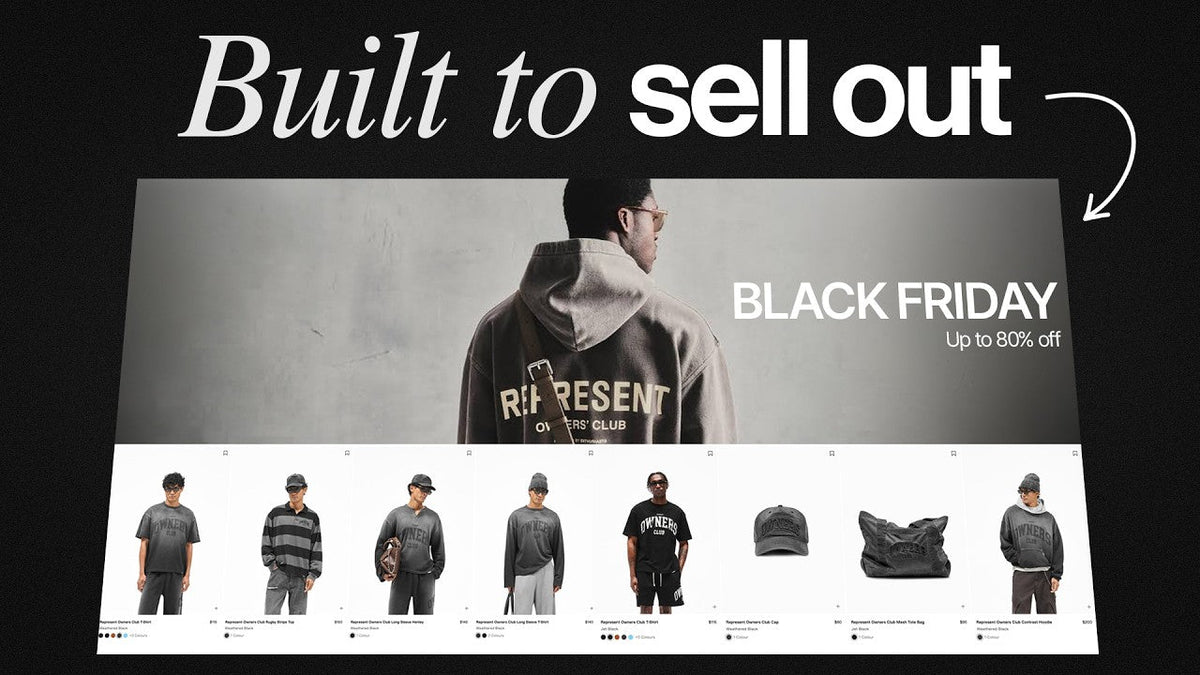
Go to almost any clothing brand's website on Black Friday, and you'll see one of two things.
The first looks like a clearance warehouse.
Bright red banners. Huge 70% OFF signs. Countdown timers everywhere. Pop-ups stacked on top of more pop-ups.
Everything screams, "BUY NOW!"
And sure, that approach might generate sales for a few days.
But what happens when Black Friday ends?
Customers start waiting for the next discount. Your products become harder to sell at full price. And suddenly, December and January aren't looking so good.
Now look at how premium clothing brands handle Black Friday.
They might offer the same discount. Sometimes even a bigger one.
But their websites don't look desperate.
The photography is still beautiful. The products are still the focus. The shopping experience feels exactly like the brand customers already know.
The difference isn't just better design.
It's a completely different Black Friday strategy.
I'm Christian, co-founder of BitBranding. We've been building Shopify stores for clothing brands and boutiques since 2015.
Every year, we help brands prepare for Black Friday. And we've seen how different approaches affect the shopping experience and sales performance.
In this guide, I'm going to show you how to build a premium Black Friday experience across your entire Shopify store.
We'll cover your homepage, collection pages, product pages, cart, checkout, and even what happens before the sale starts.
The goal is simple.
Generate strong Black Friday revenue without damaging the brand you've worked so hard to build.
1. Premium Brands Sell Access. Mass-Market Brands Sell Discounts.

This is the most important concept in the entire article.
Mass-market brands lead with the discount.
Premium brands lead with access.
Here's what I mean.
|
Mass-market messaging |
Premium brand messaging |
|
70% OFF EVERYTHING! |
Our only sale of the year |
|
HUGE BLACK FRIDAY BLOWOUT! |
The archive collection is now open |
|
FINAL HOURS! DON'T MISS OUT! |
Private access ends tonight |
|
BIGGEST DISCOUNTS EVER! |
Friends & Family Event |
|
EVERYTHING MUST GO! |
A limited opportunity to shop the collection |
Both brands might offer 30% off.
But they're selling two completely different experiences.
One is selling at a lower price.
The other is offering a limited opportunity to buy something desirable.
And that distinction matters.
When your discount becomes the main reason someone buys, you're competing against every other brand willing to offer a bigger discount.
But when the product remains the focus, customers still care about the fit, quality, design, and identity behind your brand.
The discount simply gives them a reason to purchase now.
Why this protects your brand after Black Friday
Here's something clothing brand owners need to think about.
Black Friday doesn't happen in isolation.
You still need to sell products in December, January, February, and the rest of the year.
If customers learn that your products are constantly available at massive discounts, some will become less willing to pay full price.
That's a dangerous habit to create.
Instead, I recommend positioning Black Friday as a limited event.
Your customers should think:
"I've wanted that jacket for months. This is my opportunity to get it."
Not:
"I'll wait until they discount everything again."
The takeaway: Make your products desirable first. Let the offer create urgency.
2. Keep Your Shopify Announcement Bar Simple
Let's start at the very top of your website.
Your announcement bar.
This is one of the easiest places to make your store look cheap during Black Friday.
I've seen brands completely change their announcement bars to bright red or yellow, add flashing messages, and rotate through four different promotions.
You don't need any of that.
A premium announcement bar should communicate two things:
-
What the offer is.
-
When it ends.
That's it.
For example:
"Private Black Friday Access | Ends November 27"
Or:
"Our Annual Event | 25% Off Selected Styles Through Monday"
Use your existing brand colors and typography.
If your website normally uses black, cream, and white, keep those colors.
You don't need to redesign your brand for one weekend.
How to set this up in Shopify
Most modern Shopify themes include an announcement bar section.
Here's the basic process:
-
Go to Online Store → Themes → Customize.
-
Open your Header or Announcement Bar section.
-
Replace multiple rotating messages with one clear offer.
-
Keep the background and text colors consistent with your brand.
-
Link the announcement to your Black Friday collection if your theme supports it.
-
Check how it looks on mobile.
If your theme has a rotating announcement carousel, consider disabling it during the promotion.
Customers shouldn't have to wait for a message to rotate to understand your offer.

Your announcement bar should feel like a natural part of your website, not an advertisement pasted on top of it.
3. Your Black Friday Homepage Should Still Sell the Product

This is probably the biggest mistake I see clothing brands make.
They replace their homepage hero image with a giant discount percentage.
No model. No lifestyle photography. No product story.
Just a huge "50% OFF."
Here's the problem.
People don't buy percentages. They buy products.
Someone visits your store because they want a jacket, a dress, or a pair of jeans.
The discount might encourage them to buy today, but it's not what made them interested in the first place.
That's why I recommend keeping your homepage hero focused on your products.
What a premium Black Friday hero looks like

Imagine you sell premium men's clothing.
Instead of a giant red 40% OFF graphic, your homepage features a model wearing one of your bestselling jackets.
The headline says:
"The Annual Winter Event"
Below it:
"Selected styles, available at special pricing through Monday."
And the button says:
"Explore the Collection"
That's it.
The product remains the hero.
The sale becomes the reason to act.
What belongs below your homepage hero?
During Black Friday, I recommend five sections.
First: A curated Black Friday collection.
Feature four to eight products that are included in your promotion.
These should be products customers actually want, not just items you're trying to clear out.
Second: Your bestsellers.
Your bestselling products have already demonstrated demand.
Even if some aren't included in the main promotion, they're still worth featuring.
Black Friday brings expensive traffic. Make it easy for those visitors to discover your strongest products.
Third: Social proof.
Add customer reviews, real customer photography, or relevant press mentions.
New visitors need a reason to trust you.
Fourth: Your brand story.
A short section explaining what makes your clothing different.
Maybe it's the fabric. Maybe it's the fit. Maybe it's the craftsmanship.
Whatever makes your brand special shouldn't disappear because you're running a sale.
Fifth: Shipping and returns information.
Customers shopping in November are already thinking about Christmas.
They want to know when their order will arrive and what happens if the size doesn't fit.
Make those answers easy to find.
Shopify implementation: Build a dedicated Black Friday collection
In Shopify, go to Products → Collections → Create collection.
Create a collection called "The Annual Event" or another name that fits your brand.
You can build this as a manual collection or use automated conditions with product tags or metafields.
For example, you could create a product metafield called:
custom.bfcm_eligible
Set it as a true/false field and use it to control which products appear in custom promotional sections.
For collection membership, use supported collection conditions such as a dedicated product tag, or the metafield-based conditions available in your Shopify configuration.
Then add the collection to your homepage through your theme editor.
This gives you control over which products customers see without rebuilding your website.
4. Don't Let Pop-Ups Ruin the Shopping Experience
Let's talk about pop-ups.
Before Black Friday, pop-ups can be extremely valuable.
During Black Friday, they can become a problem.
Here's why.
Imagine someone visits your website after clicking an email announcing your sale.
They already know the offer.
But before they can shop, a pop-up appears asking them to subscribe for 10% off.
Now they're confused.
Does the extra discount stack? Do they need a code? Is this a different offer?
You've just added friction to a customer who was ready to shop.
I recommend separating your pop-up strategy into two phases.
Before Black Friday: Capture early access sign-ups
Use your pop-up to invite visitors to join your VIP list.
Example:
"Get First Access to Our Annual Event"
"Subscribers shop 24 hours before everyone else."
This gives customers a real reason to share their email address.
During Black Friday: Reduce interruptions
Once the sale is live, either turn off your standard pop-up or replace it with a message that supports the promotion.
Avoid stacking discount offers.
If you're using Klaviyo or another email platform, create separate display rules for your pre-sale and live-sale campaigns.
Exclude existing subscribers where appropriate, and make sure the pop-up doesn't interrupt checkout-focused traffic.
Your goal is to help customers shop, not make them close three windows before they can see a product.
5. Build Black Friday Collection Pages That Make Shopping Easy

Your collection page has one job.
Help customers find the right product quickly.
During Black Friday, people are comparing products, checking sizes, and making buying decisions faster than usual.
The last thing you want is a collection page that's difficult to navigate.
I recommend keeping your collection page clean and focused.
Use filters that matter to clothing shoppers
At a minimum, customers should be able to filter by:
-
Size and availability
-
Product category
-
Color
-
Price
-
Fit or style, when relevant
Use Shopify's Search & Discovery app to configure supported filters, including filters based on product options and metafields.
For example, if you sell denim, create a product metafield for fit:
custom.fit
Possible values might include Slim, Straight, Relaxed, and Wide Leg.
Once you've configured the metafield and its filter, customers can narrow the collection to the fit they actually want.
That's far more useful than forcing them to scroll through 80 products.
Don't turn every product card into a discount advertisement
I've seen collection pages where every product has multiple badges.
SALE. HOT. 40% OFF. LIMITED TIME.
At some point, the product disappears behind the promotion.
For premium brands, I prefer a single, understated sale badge.
Keep your product photography consistent. Display the original and sale prices clearly. Make sure customers can see the available colors and styles.
If you're showing discount percentages, make sure the calculation is accurate and the original price is a genuine reference price.
Use Shopify metafields to maintain consistency
If you're running a large clothing store, you don't want to manually update dozens of product cards.
You can use Shopify metafields to store reusable information such as:
|
Metafield |
Example value |
Purpose |
|
custom.fit |
Relaxed |
Collection filtering |
|
custom.fabric |
100% organic cotton |
Product information |
|
custom.care |
Cold wash |
Care instructions |
|
custom.shipping_note |
Dispatches in 1–2 business days |
Delivery clarity |
|
custom.bfcm_eligible |
True |
Promotional merchandising |
Your developer can reference these fields in Liquid, while supported themes can connect metafields through dynamic sources.
For repeated content shared across many products, Shopify metaobjects can also help.
For example, create a "Fabric Story" metaobject with a name, description, image, and care guidance.
Products using the same material can reference that entry instead of duplicating the information.
The result is a cleaner shopping experience that's easier to maintain.
And that matters when you're preparing hundreds of products for Black Friday.
6. Your Product Pages Need to Build Confidence, Not Just Show Savings

Your product page is where customers decide whether to buy.
And during Black Friday, that decision often happens quickly.
That's why I don't recommend completely redesigning your product pages for the sale.
Keep the elements that already make your brand feel premium.
Your photography, typography, product descriptions, and layout should remain familiar.
Then add the information customers need to purchase with confidence.
Show the discount without making it the main attraction
Let's say you're selling a premium hoodie.
Regular price: $120.
Black Friday price: $90.
You can display both prices clearly.
But your product page should still explain why the hoodie is worth owning.
Talk about the fabric, fit, construction, and details that make it different.
If your only selling point is that it's $30 cheaper, you're not giving customers much reason to buy it when the promotion ends.
Make size and fit information easy to find
One of the biggest concerns when buying clothing online is whether it will fit.
I recommend including a clear size guide, model measurements, and specific fit notes.
For example:
"Relaxed fit. Model is 6'1" and wears a medium."
That's more useful than saying "premium fit" or "true to size" without additional context.
You can store these details in Shopify metafields and connect them to your product page sections.
If you use a size recommendation app, test it before Black Friday rather than introducing an untested tool during your busiest sales period.
Put shipping deadlines near the Add to Cart button
This is one of the most overlooked opportunities on a Black Friday product page.
People shopping in November often want their products before Christmas.
They shouldn't have to search through your footer to find out whether an order will arrive in time.
Put a short shipping message directly below your Add to Cart button.
For example:
"Order by December 15 for estimated delivery before Christmas."
Only use that date if it reflects your actual fulfillment capacity and carrier guidance. Don't promise guaranteed delivery unless you can support that promise.
Also make your holiday return and exchange terms visible.
If you offer extended returns, say so.
If sale items are final sale, make that clear before checkout.
Customers shouldn't discover important conditions after purchasing.
Add gifting options and relevant cross-sells
Black Friday isn't just about people shopping for themselves.
It's also a major gifting opportunity.
Consider offering gift wrapping, gift messages, or curated bundles if your fulfillment process can support them.
For clothing brands, I also like a "Complete the Look" section.
If someone is buying a jacket, show them the trousers or shirt that work with it.
If they're buying a hoodie, maybe show them a matching cap.
The goal isn't to recommend more random products.
It's to help customers build a better outfit.
How to implement cross-sells in Shopify
Shopify Search & Discovery supports complementary product recommendations.
You can manually assign products that work together, then display them using a compatible theme section.
For more advanced bundles or add-ons, you can evaluate Shopify-compatible bundling and upsell apps.
If you're building custom functionality with Liquid or AI-assisted code, test inventory behavior, discount eligibility, and mobile performance before publishing.
A cross-sell that breaks the cart is worse than no cross-sell at all.

THE ESSENTIALS COLLECTION
Heavyweight Hoodie
$90
$120
Relaxed fit · Heavyweight cotton
Size guide and model measurements
Add to Bag
Holiday shipping information
Returns and exchanges
Illustrative layout: preserve product storytelling while making pricing, fit, delivery, and returns easy to understand.
7. Make Your Cart and Checkout Faster, Not Louder

Black Friday shoppers don't want a complicated checkout.
They're often shopping on their phones, switching between stores, and comparing products.
Every unnecessary step creates another opportunity for them to leave.
I recommend reviewing your cart experience well before Black Friday.
For many clothing stores, a cart drawer works well because customers can review their order without leaving the page.
But don't assume a cart drawer automatically converts better than a cart page.
Test the experience on mobile, especially if your theme or cart apps introduce additional scripts.
Three things I'd consider adding to your cart
1. Show the customer's total savings.
If a customer saves $45, make that easy to see.
A simple line such as "You've saved $45" can reinforce the value of the purchase without making the entire website feel like a clearance sale.
The savings calculation should match the discounts actually applied to the cart.
2. Show progress toward free shipping.
If you're offering free shipping above $150 and the customer's cart is $120, show:
"You're $30 away from free shipping."
This gives them a useful reason to add another product.
However, don't offer free shipping just because everyone else does.
Make sure your margins can support it.
3. Recommend one or two relevant add-ons.
If someone is buying a jacket, perhaps a cap or accessory makes sense.
Keep these recommendations small and relevant.
Your cart should help customers complete their order, not turn into another collection page.
Use automatic discounts whenever possible
One of my biggest recommendations for Black Friday is to reduce the need for discount codes.
If a customer has to leave checkout to find a code, you've created unnecessary friction.
Shopify supports automatic discounts for eligible products, orders, and shipping promotions.
You can configure these through Discounts → Create discount and choose the appropriate automatic discount type.
For example, you might create:
"25% off selected Black Friday styles"
Then restrict eligibility to your promotional collection.
Test how the discount behaves alongside any other active offers, including whether combinations are allowed.
For VIP-only pricing, make sure the offer is genuinely restricted to eligible customers. Depending on your Shopify setup, this may require customer segmentation, a dedicated discount link, or a compatible app or custom discount function.
Don't assume that hiding a sale page makes the discount private.
Enable accelerated checkout options
Shop Pay, Apple Pay, and Google Pay can help eligible customers complete purchases with fewer steps.
Check which options are available for your store, payment provider, and customers.
I also recommend testing accelerated checkout buttons with your Black Friday discount rules.
Make sure customers see the correct price, shipping charges, and delivery options.
Faster checkout is useful.
But only when the order is accurate.
8. The Real Premium Black Friday Strategy Starts Before Black Friday
Now we get to the part I think matters most.
Early access.
Most clothing brands spend all their time preparing for the public Black Friday launch.
But premium brands can create an entirely different experience by giving their best customers access before everyone else.
Instead of announcing a massive discount to the whole internet, invite your email and SMS subscribers to shop first.
Maybe they get 24 hours.
Maybe 48 hours.
The exact window matters less than making the access feel valuable and keeping the promise.
Why early access works
There are three major advantages.
First, it rewards your existing customers.
You're giving people a reason to stay subscribed and pay attention to your brand.
Second, it gives you an opportunity to generate revenue before the main Black Friday rush.
That may reduce your dependence on acquiring every sale through expensive last-minute advertising.
Third, it gives you information.
You can see which products are selling, which sizes are moving, and which collections customers care about before the public launch.
Then you can adjust your merchandising and promotional focus.
Build a dedicated early access landing page
I recommend creating a landing page several weeks before Black Friday.
Keep it simple.
Headline:
"Our Only Sale of the Year Is Coming"
Supporting copy:
"Join the list for private access before the event opens to everyone."
Then include an email signup form and an optional, separately consented SMS signup.
You can create the page through your Shopify theme, a landing page builder, or your email platform's signup tools.
If you're using Klaviyo, connect the form to a dedicated Black Friday segment so you can send targeted messages.
How I would structure the email sequence
|
Timing |
Email purpose |
Example subject |
|
2–3 weeks before |
Build anticipation |
Something special is coming |
|
1 week before |
Explain VIP access |
Your invitation to shop first |
|
Early access launch |
Open the private event |
Your early access starts now |
|
Public launch |
Announce general availability |
The annual event is now open |
|
Final day |
Remind customers of the deadline |
The annual event ends tonight |
Don't send the same message five times.
Each email should have a clear purpose.
And don't rely entirely on discounts.
Use product photography, bestselling collections, customer reviews, and your brand story to keep the focus on what you're selling.
9. Use TikTok Shop, Social Commerce, and AI Without Diluting Your Brand
Black Friday traffic doesn't just come from Google and Meta ads anymore.
Customers discover clothing brands through short-form video, creator content, social shopping, and increasingly personalized product recommendations.
But the same rule still applies.
Your product should lead. The promotion should support it.
TikTok Shop and creator content
If TikTok Shop is available in your market and suitable for your brand, consider using creators to show your products in real situations.
For example, instead of a video that simply says "40% OFF," have a creator explain how they style one of your bestselling jackets.
Show the fit, fabric, and details.
Then mention that the product is part of your annual event.
That gives viewers a reason to want the product before they consider the discount.
If you're connecting TikTok Shop to Shopify through a supported integration, confirm that inventory, product eligibility, and pricing remain synchronized.
TikTok Shop promotions and your Shopify website discounts may be managed separately, so test both channels.
Meta and Google campaigns
For Meta and Google, I'd separate campaigns by customer intent.
Use prospecting campaigns to introduce your products and brand.
Use remarketing to reach people who have already viewed products, engaged with your content, or added items to their carts.
Your ad creative should match the landing page.
If an ad features a premium winter collection, send visitors to that collection, not a generic discount page.
AI-driven personalization
AI-powered recommendation tools can help show customers products that match their interests or shopping behavior.
But don't install a new personalization app the night before Black Friday.
Test recommendations beforehand.
Check that suggested products are in stock, that the recommendations make sense, and that the app doesn't slow down your mobile experience.
The best personalization feels useful.
Customers should feel like you've made shopping easier, not like they're being followed around by promotions.
Measure profitability, not just revenue
Here's where I see brands make expensive mistakes.
They look at Black Friday revenue and assume a big number means a successful campaign.
But revenue doesn't tell the full story.
You need to understand your margins.
Consider a simple example.
Illustrative Black Friday unit economics

Now imagine you increase the discount to 40%.
Your selling price drops to $60.
With the same costs, your contribution after advertising falls to zero.
You might generate more orders, but that doesn't automatically mean you're making more money.
This is why I recommend setting your offer based on product margins, customer acquisition costs, and inventory goals before you design your Black Friday graphics.
A premium brand should be disciplined about both presentation and profitability.
10. Use Real Urgency, Not Fake Countdown Timers
Urgency can work during Black Friday.
But there's a difference between genuine urgency and manufactured pressure.
I've seen clothing stores use countdown timers that reset every time you refresh the page.
I've seen low-stock warnings that appear on every product, even when there's plenty of inventory.
Those tactics might push some customers to buy.
But they can also damage trust.
Premium brands don't need fake urgency.
They already have real reasons for customers to act.
Maybe the sale ends Monday.
Maybe a popular size is almost sold out.
Maybe VIP access closes tonight.
Those are legitimate reasons to buy now.
How to create genuine urgency in Shopify
Use accurate inventory data to show low-stock messages when appropriate.
For example:
"Only 3 left in Medium."
Make sure the message reflects the selected variant's actual available inventory.
If you're using a countdown timer, connect it to a genuine promotion deadline.
Don't reset the timer when the customer returns.
And if you extend your Black Friday sale, communicate that honestly rather than pretending the original deadline still applies.
Urgency should come from real limitations, not tricks.
11. Roll Out Your Black Friday Shopify Store in Four Stages

Here's something I've learned from working with clothing brands.
The brands that look the most organized during Black Friday usually did the most preparation beforehand.
They're not redesigning their websites at midnight.
They're not changing offers every few hours.
They already know exactly what customers will see at every stage.
I recommend planning four distinct phases.

Schedule your changes in advance
Shopify offers tools for managing scheduled storefront changes, including Launchpad for eligible Shopify Plus stores.
Depending on your plan and theme, you may also use scheduled theme publishing, theme duplication, or compatible campaign scheduling apps.
Not every scheduling feature is available on every Shopify plan.
The important thing is to prepare and test the experience before the promotion begins.
Create a duplicate of your live theme, build the Black Friday changes, and check everything on desktop and mobile.
Test your discount rules, product links, shipping messages, and checkout.
Then establish a clear launch and rollback plan.
Black Friday is not the time to discover that your sale collection is empty or your checkout discounts aren't working.
12. Your Premium Black Friday Shopify Checklist
Here's the checklist I'd give a clothing brand owner preparing for Black Friday.
Black Friday launch readiness

You don't have to implement every advanced feature to have a successful Black Friday.
Start with the fundamentals.
A strong offer. Clear merchandising. Great product photography. Accurate shipping information. A smooth checkout.
Then add the features that make sense for your store.
13. What to Measure After Black Friday
One final point.
Don't judge your Black Friday performance by total revenue alone.
I recommend reviewing the following metrics:
|
Metric |
What it tells you |
|
Conversion rate |
How effectively visitors became buyers |
|
Average order value (AOV) |
How much customers spent per order |
|
Contribution margin |
How much revenue remained after variable costs |
|
Customer acquisition cost (CAC) |
What it cost to acquire customers |
|
Revenue from VIP early access |
How much your existing audience contributed |
|
Returning customer rate |
How much repeat business supported the event |
|
Refund and return rate |
Whether promotions attracted profitable orders |
|
Post-sale full-price sales |
Whether demand continued after the event |
Use Shopify Analytics alongside your advertising and email platform reporting.
Compare performance with previous campaigns and with your normal trading periods.
Also look at what happens in December and January.
Did customers return?
Did full-price sales recover?
Did the event bring in customers who purchased again?
Those answers matter just as much as your Black Friday revenue.
Because the goal isn't to have one impressive weekend.
It's to build a clothing brand that continues growing after the discounts disappear.
Final Thoughts: Premium Brands Don't Need to Look Cheap to Sell More
Black Friday is one of the biggest sales opportunities of the year for clothing brands.
But it's also one of the easiest times to damage your positioning.
You spend months building a brand that customers recognize and trust.
Then Black Friday arrives, and suddenly your website looks like every discount store on the internet.
It doesn't have to be that way.
You can offer competitive promotions while maintaining the same premium shopping experience your customers expect.
Keep your product photography front and center.
Use your existing visual identity.
Make your offer easy to understand.
Give your best customers early access.
Remove friction from your product pages and checkout.
And most importantly, plan everything before the weekend begins.
Premium brands don't avoid Black Friday. They make Black Friday feel like part of their brand.
That's the difference.
Want Help Building a Black Friday Strategy That Actually Makes Money?
At BitBranding, we've been helping clothing brands build and optimize Shopify stores since 2015.
We understand the difference between generating sales and building a profitable clothing business.
If you're preparing for Black Friday and want to improve your offer, website experience, conversion rate, and overall profitability, we can help.
We'll look at where your store is today, identify opportunities to improve, and help you understand what to focus on next.
Schedule Your Free Strategy Session
Let's make Black Friday a growth opportunity for your brand, not just another discount weekend.
FAQs
Should premium clothing brands offer Black Friday discounts?
Yes, when the promotion supports their margins and brand positioning. A premium brand can offer discounts without turning price into its main selling point. Limited access, curated collections, and strong product presentation help preserve the value customers associate with the brand.
How can Shopify stores prepare for Black Friday?
Start by reviewing product margins and choosing eligible products. Then prepare the promotional collection, homepage, product pages, discounts, shipping information, and checkout. Test the entire customer journey before launch.
What is VIP early access for Black Friday?
VIP early access gives selected customers, such as email or SMS subscribers, the opportunity to shop before the public sale begins. It can reward loyalty, build anticipation, and help brands understand demand before the main event.
How do you increase Black Friday sales without bigger discounts?
Focus on improving product discovery, size and fit information, customer reviews, relevant cross-sells, shipping clarity, and checkout efficiency. These changes can improve the buying experience without requiring a deeper discount.



Share:
Ranking the Best and Worst Advice for Scaling a Clothing Brand